

How to adapt to Industry 4.0: a step-by-step Guide
Companies are placing enormous focus on aligning their systems and processes with the requirements of Industry 4.0 and with the wave of new innovative technologies and Artificial Intelligence (AI) that will continue to impact many industrial sectors in the future. With all these technical advances pending on the horizon, we will see the gradual replacement of people who traditionally perform repetitive, labor-intensive manual and transactional tasks or activities. So, with that in mind, how should your modernized operating business and your quality system adapt in the 4.0 era? What should they look like and how should they be configured?
When we look at how current operating systems appear, the picture can in many cases be excessively complex, because we have a vast mix of input media and devices that people pull from and use daily. As we look to the future and to the dominance of digital technology combined with AI, it becomes clear that our platform for a business operating system needs to be configured to have simple, straightforward processes. It seems fairly obvious, but it is amazing to see how much humans can overcomplicate things when they do not consider the frustration for users. How can lean help us shape these technology platforms and how can we rethink our way of working as we find ourselves having to reshape or replace what we have today in order to achieve better results tomorrow? How can we help influence the way these platforms are fundamentally structured and what they might look like in the new digital landscape in which companies will have to operate?
Having thought about and paid a lot of attention to this during my journey, here are some important steps to consider when you face this challenge in your business.
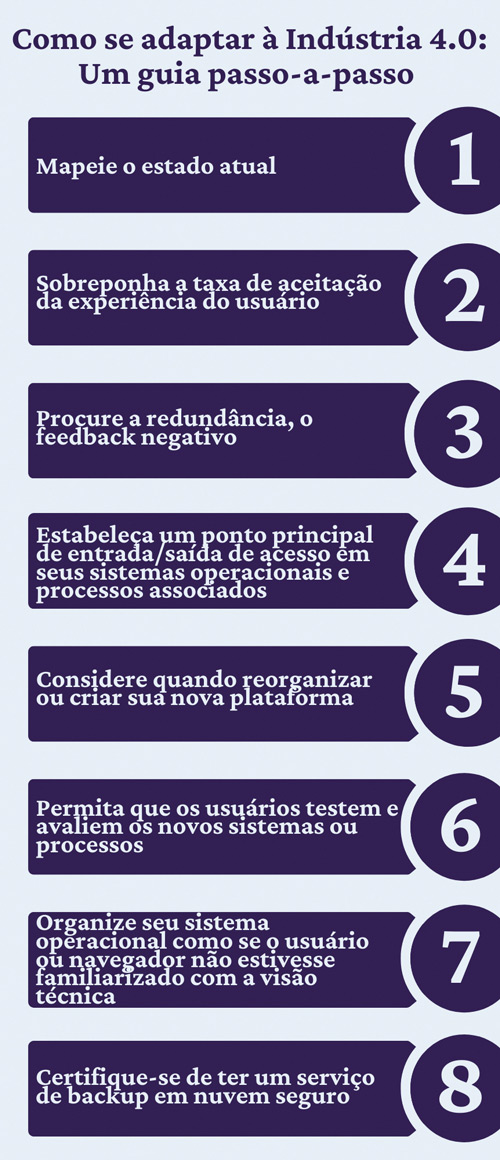
- Map the current state of where the existing systems, processes and information reside, in what form of media, initial location or system architecture, and how they can be accessed – hard copy, digital interface, remote server file-type configuration, centralized and decentralized, cloud configuration.
- The current state of the system and process information flow can be on a whiteboard or on the office wall, using colored Post-its – the colors should denote differences in type, function/department and area/site (you can decide the specifics based on how your company is currently configured).
- Overlay on this current state the user experience acceptance rate (it can be subjective feedback/survey ratings), what people really think about the system or process they use today, and information on whether they perceive it as useful and beneficial or as an obstacle or burden.
- Now look for redundancy, negative feedback, the time it takes to retrieve or use what is shown on the current-state map, and what can or should be replaced, updated or decommissioned. What can be simplified, reconfigured and obviously improved. It can be a surprising picture.
- Establish a main entry/exit access point into your operating systems and associated processes, the main window or dashboard. You should emphasize how it looks and works – keep it clean, simple, straightforward, with attractive visual icons and the minimum number of mouse “clicks” to access the next subsite or directory.
- When reorganizing or creating your new platform from the current state, consider how the data will flow and the applications that will interface with the platform. Are the APIs secure, easily established and compatible with any new replacement digital technology you want to build or migrate to the enhanced operating system? Also look at how and when (timing and responsibility) applications can be moved with minimal disruption or interference to current business activity.
- Any new or existing system or process that you want to create or migrate to a new digital application must be thoroughly tested and evaluated by potential users before it is launched to the general population of users who will use the new platform (key point). Why? You need to ensure high user engagement from the start for this to happen. Therefore, in advance, survey former users about all the negative characteristics of the previous system or process to be replaced or updated, and incorporate their comments, lessons and experiences into what you intend to launch (this goes back to point 3).
- Organize your operating system as if the user or browser were not necessarily familiar with the technical view or did not understand things the way you (as the builder) or a traditional technical user might (another key point). What I mean here is to create a simple path or sequence of steps (minimal mouse clicks) so that most people who are not familiar can follow a logical, common-sense sequence without feeling intimidated or lost on first use. Also try to include typical, well-known words and terminology at the top-level access points for a subsystem or process. Technical jargon should only appear after the user has done a detailed search, clicking two or three levels deeper.
- Make sure you have a secure cloud backup service provided for everything that operates on the platform, perpetually storing any data present and being entered 24 hours a day, 7 days a week, so that you are not caught off guard if a local or remote media device/server goes down. Everything on your platform should always be recoverable and current. It is important to plan for this, because it is inevitable that you will experience outages or hacking attempts on your system.
As a lean thinker, I used all the points above and trained the technical specialists in certain functions and disciplines to consider the obvious and not-so-obvious touchpoints. They often could not see them: technically oriented people can be blinded by too great a focus on a fixed path. Sometimes they cannot “see the wood for the trees,” as the saying goes. I often had to describe the scenario and ask “why” to provoke them to stop and think. Without providing an answer or solution, I tried to impress on people the need to eliminate waste in the systems and processes we created, remove unnecessary or complex steps, level out irregularities or complexities in the connections, and create simple, direct paths. I also emphasized the importance of eliminating the burden and frustration of the user experience in order to get the best out of what was built.